
Your property may not be displaying on Rightmove, as we've not received an update from your data feed software, or there was an issue when the update came through to Rightmove.
If your property isn't displaying on any portal, contact your software provider, as there's likely to be a problem sending the data to a portal. Or if you don't use a feed or you use an overnight feed and you are having errors contact us.
See below the checks you can do, depending on your upload method:
- I upload my properties using a data feed software
- I upload my properties using an Overnight Feed
- I upload my properties using Rightmove Plus
I upload my properties using a data feed software
Follow the steps below to check why the property isn't showing or a property update is not being reflected on Rightmove:
- Check whether the property is showing elsewhere
- Is the property displaying correctly on your own website or other portals, but not on Rightmove?
- Wait at least one hour after making changes
- If you updated the listing recently, allow up to one hour for the changes to appear.
- Check the Real‑Time Data Feed (RTDF) Error Report
- Log in to Rightmove Plus
- Click your initials in the top‑right corner
- Select RTDF Error Report
- Look for any errors linked to the property
- Fix the listed issue in your software and resave the property
- Check whether the property is Live or Not Live
- In Rightmove Plus, go to Properties → Property List
- Change the filter from View Live to View Not Live
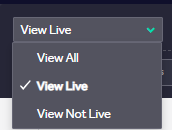
- If the property is appearing in your Not Live list with an orange exclamation mark then this would indicate Rightmove has removed the property. To find out why this has happened, hover over the exclamation for more information. If the property is showing in the Not Live without an exclamation mark then you can resave the property as 'Live'.
- If the property does not appear at all
- If the property is not visible under View All and there are no RTDF Errors, Rightmove has not received the update
- Contact your software provider to resolve the issue
- Any manual changes made by Rightmove may be overwritten by the next feed update
- Optional troubleshooting step
- Make a small change to the listing (for example, add a character to the description) and resave it to force an update through to make the property appear onsite
If you have followed the checks above and the property still won't show correctly on site then contact customersupport@rightmove.co.uk so we can investigate this.
I upload my properties using an Overnight Feed
All New Homes partners have this upload method and some Overseas partners do so ensure you are aware of how you upload properties to us first.
- You can check your 'Upload Report' to see when we last received an update from you and if an error has occurred.
- If you see an error occurring then contact us via emailing customersupport@rightmove.co.uk so we can investigate this.
I upload my properties using Rightmove Plus
- Look out for any red warnings, there are some mandatory fields that you will need to fill in before you can upload the property so ensure you have completed all required fields before saving the property.
- If you have filled in the mandatory fields and your property is still not displaying on Rightmove, send an email to customersupport@rightmove.co.uk so we can have a look at the data we are receiving.