
Check the filters are accurate in your Market Share report so you don’t miss out on how your properties are performing. Keep in mind that the reports reflect property data after 24 hours.
Tip: property types and postcodes tend to be the common filters that are missed out. You can add in a custom postcode sector to the specific market share report if you want the postcode to show as a one off.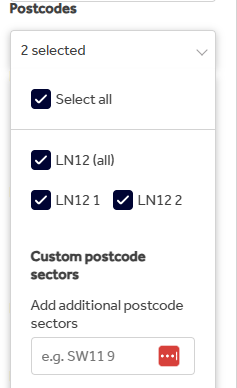
Please check that the postcode of the property you're marketing is included in your default patch as if it isn't, the property won't be automatically included in the Market Share reports.
For a property to appear in this report it must be advertised on Rightmove with an Available status for a minimum of 24 hours. After this timeframe you can amend the status to Sold STC/Under Offer or Let Agreed and the property can be found in that report.
A property will not appear in the report if:
- The status is changed from Available to Sold STC, Under Offer, or Let Agreed on the same day it is first uploaded.
- The property is uploaded directly as Sold STC, Under Offer, or Let Agreed without first being listed as Available for at least 24 consecutive hours.
- The property was previously listed as Available, then completely removed, and later re-uploaded as Sold STC, Under Offer, or Let Agreed.
When a property is re-uploaded, a new property record is created so the property does not inherit the previous property's history. As a result, it will not qualify for inclusion in the report unless it is then listed as Available for a minimum of 24 consecutive hours before the status change occurs.
If you've done these checks and you're still experiencing an error with seeing the property in the reports or if you have any feedback, email customersupport@rightmove.co.uk and we'd be happy to investigate this.