
This FAQ explains why a property may no longer be visible on Rightmove, how and why properties are automatically removed, and what you need to do if your property still needs to be advertised.
How it works
Industry guidance recommends that properties are withdrawn from advertising once a sale has completed or a tenant has moved in.
To help keep listings accurate and up to date:
- Sales properties are automatically removed from Rightmove if they have been marked Sold STC / Under Offer for 8 months
- Rental properties are automatically removed if they have been marked Let Agreed for 6 weeks
If your property is removed for either of these reasons:
- We’ll email your Main branch email address to let you know
- The property will no longer appear live on Rightmove
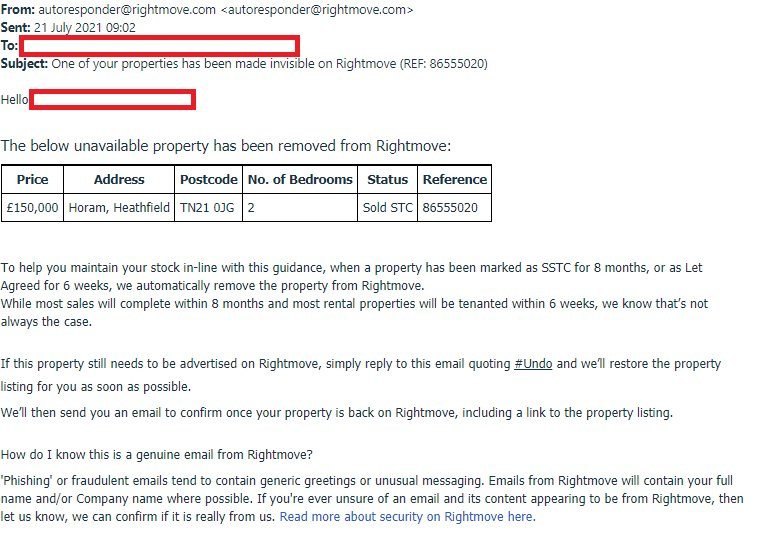
I still need the property advertised
While most sales will complete within 8 months and most rental properties will be tenanted within 6 weeks, we know that’s not always the case. If the sale has not completed or the tenancy has not started and the property should remain live:
- Open the email we sent you about the removal
- Reply to the email
- Include #Undo in your reply
We’ll check that the property has not completed and then reinstate the listing.
Once this is done, we’ll email you to confirm the property is back on Rightmove and include a link to the listing.
Once this is done, we’ll email you to confirm the property is back on Rightmove and include a link to the listing.
How can I tell my property has been removed?
You can check this in Rightmove Plus as well as via the email notifying you of the property's removal.
Check in Rightmove Plus
- Log in to Rightmove Plus
- Go to Properties
- Select Property List
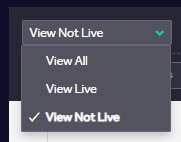
- Change the default filter from View Live to:
- View Not Live, or
- View All (this shows both live and not‑live properties)
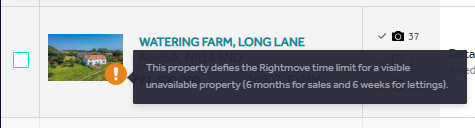
If the property was removed:
- You’ll see an orange exclamation mark next to the listing
- A message will explain that the property was removed because it has been marked Sold STC / Under Offer or Let Agreed for longer than the allowed timeframe
Why can I see a different message next to the orange exclamation mark?
If you see a different message next to the orange exclamation mark, the property may have been removed for another reason.
1. Data Quality removal
If something is missing or doesn’t look right on the listing, our Data Quality team may remove it so the below message appears:
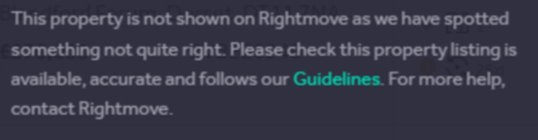
A property may have been removed by our Data Quality because of one of the reasons below:
- An agent is never instructed on a property
- Multi-listing cases
- Offensive listing
- Fake properties
What to do:
- Reply to the email we sent you about the issue, or
- Call 01908 712220
The team will investigate and help reinstate the property once the issue is resolved.
2. Land Registry completion detected
We receive monthly updates from:
- HM Land Registry (England & Wales)
- ROS – Register of Scotland
If a property is detected as completed, it is automatically removed from Rightmove and you’ll receive an email explaining why and the below message appears:
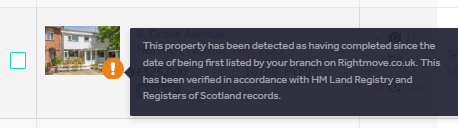
What to do:
- Reply to the email you received, or
- Contact customersupport@rightmove.co.uk
We’ll check the completion status and reinstate the property if it has not completed.
If you have feedback or a feature request
If you have feedback about property removals or suggestions for improvement, email customersupport@rightmove.co.uk.
To help us review your feedback, include:
- The property reference
- Whether the property is sales or lettings
- What you expected or would like to happen