
Discover how to enhance your New Homes leads as part of the Ascend Package to include additional qualifying questions and preferred appointment times for a viewing.
- Buyer Profile
- Appointment Booking
- Signing in and email verification
- I haven't heard back about my appointment
- I want to cancel or change my appointment request
- Can I bypass answering extra questions?
- Why are some questions disabled?
- How do I share feedback or get help with these products?
Buyer Profile
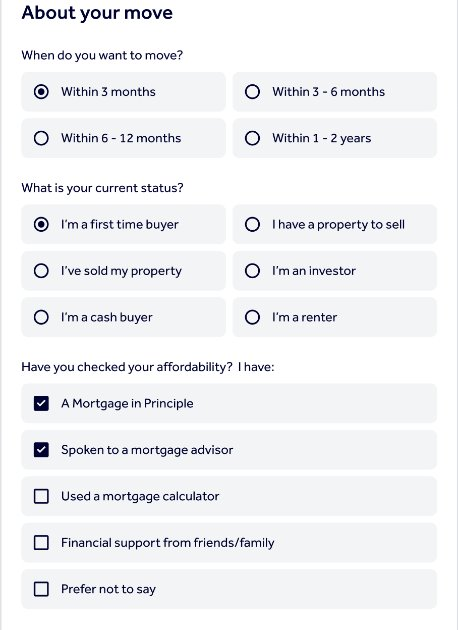
When you enquire about a new‑build property, you’ll be asked a few additional questions before you can send your enquiry. These questions help the developer understand your situation and prioritise their response. You will be asked to provide:
- Your timeframe to move
- Your buyer status (for example, first‑time buyer or cash buyer)
- Affordability information
All three questions must be completed before the Send enquiry button becomes available.
Important to know:
- If you select “I’m a cash buyer”, the affordability question will be disabled because it is not relevant.
- If you select “Prefer not to say” for affordability, all other affordability options will be greyed out.
- You cannot skip these questions if you want to send an enquiry.
Appointment Booking
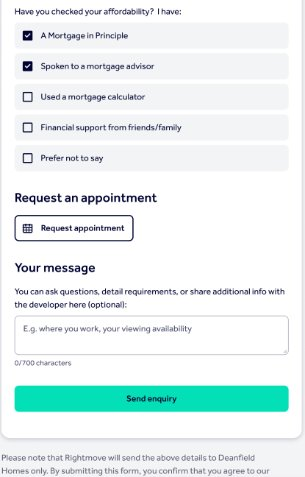
While sending an enquiry, you may also choose to request an appointment to view the property.
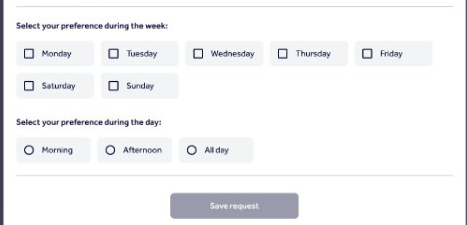
- You can select preferred days and times for a viewing.
- Requesting an appointment does not confirm a booking.
- The New Homes developer will contact you to confirm the date, time, and viewing address.
Appointment booking is optional, but Buyer Profile questions are always mandatory.
Signing in and email verification
To send an enquiry:
- You must be signed in to your My Rightmove account.
- Guest enquiries are not available for New Homes leads.
- You may be asked to verify your email address before the enquiry is sent.
If your email is not verified, the enquiry will not be delivered to the developer.
I haven't heard back about my appointment
Check the following:
- Email verification
- If your email was not verified, the enquiry was not sent.
- Verify your email and resend the enquiry.
- My Rightmove
- If you can see the enquiry under “Enquiries” in My Rightmove, the developer has received it.
- You can follow up directly with the developer using the contact details shown.
Unverified enquiries expire after 7 days if the email address is not verified.
I want to cancel or change my appointment request
Appointments cannot be edited or cancelled directly on Rightmove once submitted.
To make changes:
- Contact the New Homes developer directly.
- You can find their details under “Enquiries” in My Rightmove.
- Alternatively, you can submit a new enquiry.
Can I bypass answering extra questions?
No. The additional Buyer Profile questions are mandatory. You must complete them to send an enquiry, even if you only want to request an appointment.
Why are some questions disabled?
- Cash buyers do not see affordability questions because they are not relevant.
- Selecting “Prefer not to say” disables other affordability options to respect your choice not to share financial details.
How do I share feedback or get help with these products?
Send your feedback over to customersupport@rightmove.co.uk. When contacting us include:
- What you were trying to do
- Explain what didn’t work or what you’d like to see improved
- The property you were enquiring about