
There are a few reasons why your property may not be showing the correct status on Rightmove. The solution will depend on what method you use to upload your properties. Please check with each method below to find the best way to sort this out:
Upload via external feed provider
If you use an external CRM provider (such as Vebra/Alto, Reapit or Street) to send your properties to portals then follow the steps below to check why the status has not pulled through correctly:
- Check whether the status is correct elsewhere
- Is the property displaying correctly on your own website or other portals, but not on Rightmove?
- Wait at least one hour after making changes
- If you updated the listing recently, allow up to one hour for the changes to appear.
- Check the Real‑Time Data Feed (RTDF) Error Report
- Log in to Rightmove Plus
- Click your initials in the top‑right corner
- Select RTDF Error Report
- Look for any errors linked to the property
- Fix the listed issue in your software and resave the property
Quick error troubleshooting:
- MND_ errors will mean there is missing information in the mandatory fields Rightmove requires to advertise the property correctly on site.
- VAL_ errors, there is information in the address or postcode that cannot be verified. Check the formatting against the Royal Mail address checker.
- PER_ errors, property is being sent to the wrong channel. IE, sales property to a lettings channel.
- INT_ errors, there is an issue with a specific data entry such as shared ownership percentages or property price.
If there is no error appearing on your RTDF and the status is correct within your feed, you will need to contact your feed provider directly as there may be an issue with the connection of the feed.
Manual Uploader through Rightmove Plus
Open up the property that you wish to change the status of by accessing it through the Property List.
Firstly check for any red warnings, there are some mandatory fields that you will need to fill in before you can upload the property so ensure you have completed all required fields before saving the property.
On the right hand side of the listing, there is a box with a drop down menu to change the status.
Use the arrow to select which status you wish the set the property as.
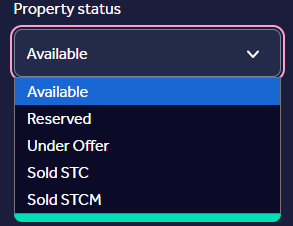
Once you have selected the relevant status,click Save Changes and this will update the property status on site. Please allow up to 30 mins for this to be visible.
If the property status doesn't change, please contact customer support via email customersupport@rightmove.co.uk